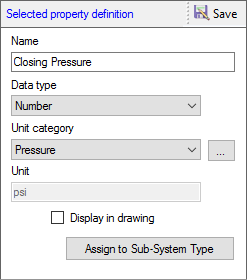
1. Edit the name of the model property, data type, unit category, and unit.
2. Select Display in drawing to display the property in the drawing.
3. Click Assign to Sub-System Type to assign the selected property to one or more sub-system types.
4. Click Save to save the changes of the property.
Note:
· Essential
model properties cannot be deleted; therefore,
 remains inactive on selection of such
essential properties.
remains inactive on selection of such
essential properties.
·  remains inactive, if Text,Currency,
or Yes/No is selected in the Unit category box.
remains inactive, if Text,Currency,
or Yes/No is selected in the Unit category box.