Migrate your existing HyDraw Library to the new HyDraw Library format. (Migration of HyDraw Library 2022 or older versions)
1. Run the HyDraw Library Manager 2024<Current Version> Start > All Apps > VEST > HyDraw Library Manager 2024<Current Version>
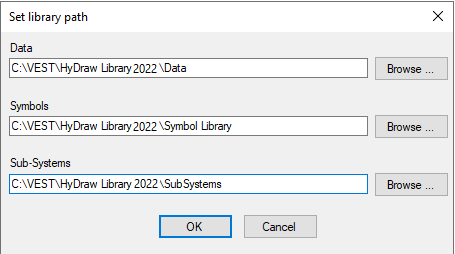
The Set library path displays.
2. Enter the Data library path
Or
Click Browse…and select the previous version of the HyDraw Library Path for the Data, Symbol, and Sub-systems library.
3. Click OK.
If the HyDraw library is 2022 version or older version, the Migrate Data Library dialog box displays.
The Create a backup before migrating option is selected by default.
4. In the HyDraw Library backup path, click Browse…and select the alternate backup path, if required.
5. Click OK to migrate the library.
On successful migration, “Your data library migrated successfully” message box displays.
6. Click OK to exit.