Create Outlines
Create outlines (assembly envelopes) for the MDTools® valves.
1. MDTools Library Manager ribbon > Outlines
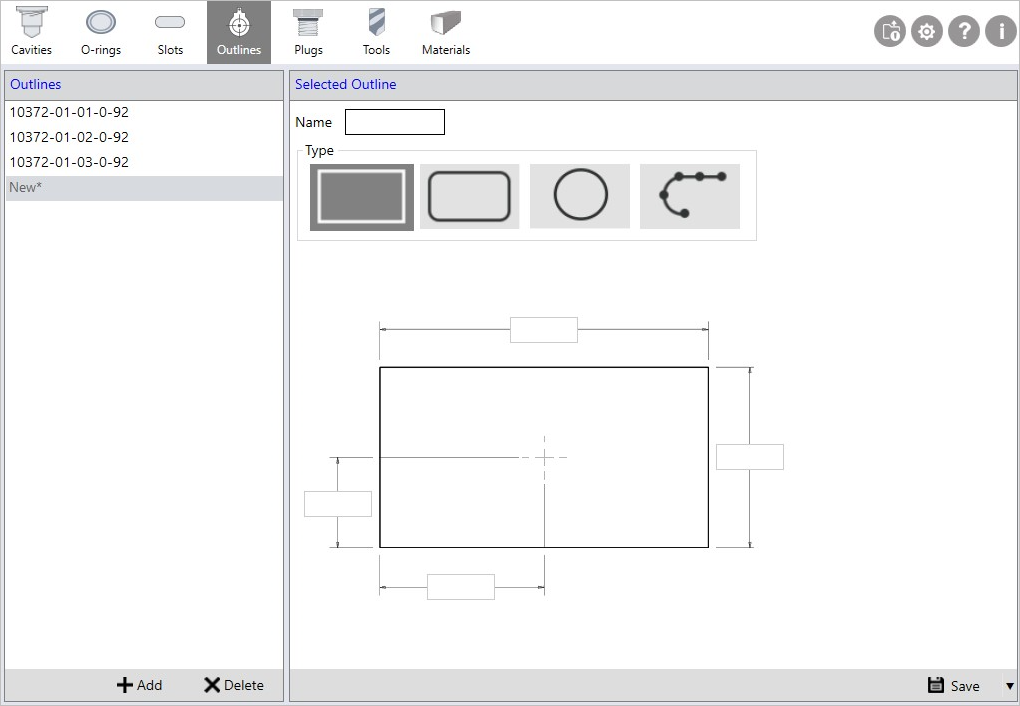
The Outlines and Selected Outline sections display.
2. Click Add to add new outline
3. Enter the Outline Name.
4. Select the Type of Outline.
Rectangle type gets selected by default for new outlines.
5. Enter Width and Height of outline.
6. Enter X and Y coordinate for the center.
The X and Y coordinates must be entered with respect to the cavity center or the center of the main cavity in the footprint.
7. Click Save to save an outline from the drop-down list at the bottom right corner.
Note:
Two separate databases are used to store the outline library in Inch and Metric units.
MDTools does not provide an Outline Library. Use MDTools Library Manager to create your own library.
All existing outline created using lower version than MDTools Library Manger 2018 treated as custom type outlines.
You can change the outline type by selecting appropriate outline Type.