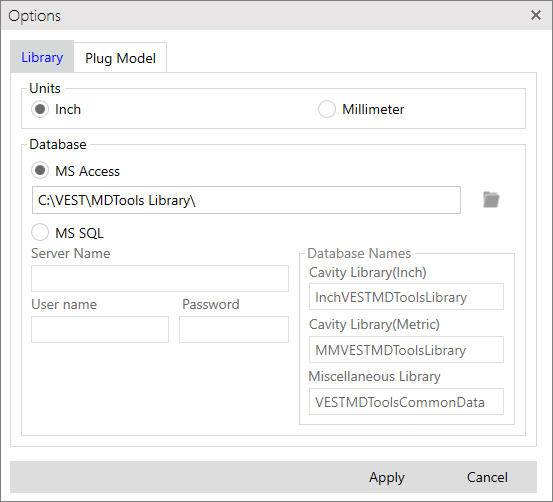
Options
Configure Unit, Path and Plug Model Library path in Options.
1. MDTools Library Manager ribbon > Options
The Options dialog box displays.
2. Select Units: Inch or Millimeter.
If Inch is selected, all MDTools® Library Manager commands use inch libraries. (i.e. InchVESTMDToolsLibrary.mdb is used for cavity command)
If MM is selected, all MDTools Library Manager commands use metric libraries. (i.e. MMVESTMDToolsLibrary.mdb used for Cavity command)
3. To Configure MS Access Library select MS Access DataBase and Click  button to browse and select the path for library location.

3. To Configure MS SQL Library select MS SQL DataBase .
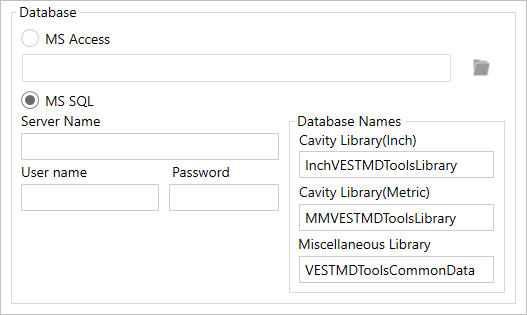
MS SQL Details
- Enter SQL Server Name,User Name, Password, and DataBase Names, Cavity Library(Inch),Cavity Library(Metric) and Miscellaneous Library
4. Select location of Plug Model Library.
Local System
If you want to use CAD files from local system.
Vault Server
If you want to use CAD files from Vault Server. You need to select the Vault Server version and fill log in details in the Vault Log In Details section.
Vault Server Details
Select Vault Server Version.
- Use the Vault 2022 and Lower option for
older versions of Vault Server.
- Use the Vault 2025 and Higher option for
latest Vault Server.
- Select Authentication type.
- Enter User Name, Password, Server and Vault details.
Program stores this log in details for current and future sessions.
You can change vault login details later at any stage.
5. Click button to browse and select the Path for the Plug Model Library location.
The Browse option will list the folders on local machine or on a vault server based on the selected option as Local System or Vault Server.
6. Select CAD Models folder in Browse for Folder dialog.
7. Click Apply to save the settings.
Apply option reloads all the data in MDTools Library Manager.
Note:
The default unit setting is Inch.
Do not edit the cavity library manually using the Microsoft Access; always use the MDTools Library Manager program to edit the library.
Microsoft Access is not required to edit the cavity library only the Microsoft Access database engine which MDTools Library Manager installs for you. You can edit the cavity library using the MDTools Library Manager even if Microsoft Access is not installed on your machine.
Two separate databases, one for inch and one for metric units are used to store the data.
The Inch library is stored in the Microsoft Access database file named, InchVESTMDToolsLibrary.mdb
and the Metric library is stored in MMVESTMDToolsLibrary.mdb.
These files are in the root (installation) directory of MDTools Library.
Share the cavity library over a network in your group by specifying the location of the library in the Options dialog box..